

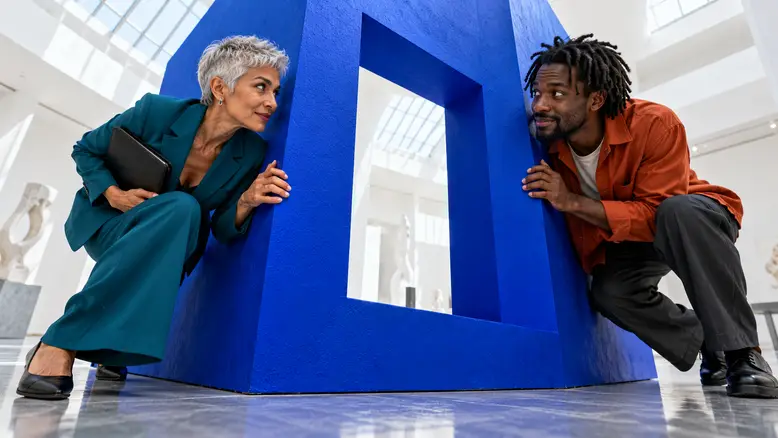
Keep two AI video characters distinct by preparing a separate identity reference for each person, approving their shared starting composition, and assigning actions and props by name. Review both characters throughout the clip. A prompt that describes two people without separating their identities leaves more room for mixed faces, exchanged clothes, duplicate figures, and confused ownership when the scene starts moving.
Why two characters can become difficult to distinguish
The challenge is more than preserving two faces. The scene also has to maintain who stands where, who owns a prop, and whose action produces the reaction. A correct-looking first frame can still become confusing when someone turns or passes behind another person.
Start by naming the visible failure. Blending makes the faces resemble each other. Swapping moves clothing, hair, or possessions between people. Duplication introduces an extra figure. Position drift changes who occupies each side of the room. These symptoms need different revisions.
Do not assume a multi-view reference sheet will be interpreted as one identity. If a model copies its panels into the scene, prepare a single clean portrait or a composed starting frame instead. The supported input mode determines how the reference packet should be used.
Four routes to a more controllable two-person scene
Choose the route from your starting material. This guide follows a composed-frame workflow because you can inspect the two people together before motion. Separate-reference workflows are also useful when the selected model supports them.
| Route | Best starting condition | Main decision |
|---|---|---|
| Compose the pair first | You need a new scene with simple blocking | Approve both identities in one starting frame |
| Supply separate references | The model accepts multiple identity inputs | Keep each input assigned to one person |
| Edit separate coverage | Shared-frame action keeps failing | Use singles and a short establishing two-shot |
| Preserve existing footage | You already have a usable performance | Keep it or use an independently verified editing route |
These are production choices, not four named PixTV features. Check the actual controls before choosing a model-dependent route. A clean edit between two stable close-ups can be more useful than an elaborate shared shot that changes the cast.
How to organize the work in PixTV
Use PixTV image generation for character and scene preparation. Keep the approved identity files separate even if you later combine them into a shared composition. For the moving shot, open video generation and choose a model whose supported inputs fit your plan.
If image-based generation is available, begin with the approved two-person frame. If the model supports separate references, identify which file represents which person and inspect that assignment before generating. Neither approach removes the need to review the entire output.
The character reference sheet guide covers building one identity. This workflow adds the relationships that become important when two identities occupy the same shot.
The example a museum scene with a single shared prop
The original scene plan follows Inez, a curator, and Malik, an exhibition designer. They study a large blue sculpture. Inez holds a closed black portfolio while Malik looks from it toward the installation. The exchange is silent, so the first version can focus on identity, position, and eyeline.
| Shot | Edit target | Main action | Identity and prop rule |
|---|---|---|---|
| Establish | 4 seconds | Both study the sculpture | Inez left Malik right portfolio with Inez |
| Reaction | 5 seconds | Malik looks from portfolio to sculpture | Malik keeps orange overshirt and empty hands |
| Resolve | 4 seconds | Inez gives a small approving nod | Teal suit and portfolio remain with Inez |
The thirteen-second plan is an editing target. Choose available generation durations and trim afterward. The cover explores their shared space playfully; the production frames use simpler standing positions so the continuity checks remain visible.
Step 1 Prepare one identity packet per character
Inez is about sixty, with light olive skin, silver pixie-cut hair, and a teal suit. Malik is about twenty-eight, with dark brown skin, short locs, a burnt orange overshirt, and charcoal trousers. These are original character specifications for this scene, not descriptions of real customers.
Prepare a front or three-quarter portrait and a full-body view for each. Keep hair, face, and wardrobe consistent within the packet. A portrait and a full-body image should agree about the person before you combine them with the other character.
Use descriptive filenames such as inez-face-approved and malik-fullbody-approved in your own files. These are asset labels, not special prompt syntax. Keep superseded versions outside the active reference folder so they are not accidentally attached to the next shot.
Compare the portraits together. The differences should remain readable without relying only on clothing color. Face structure, age, hair silhouette, and build provide independent cues when the lighting changes or a jacket leaves the frame.
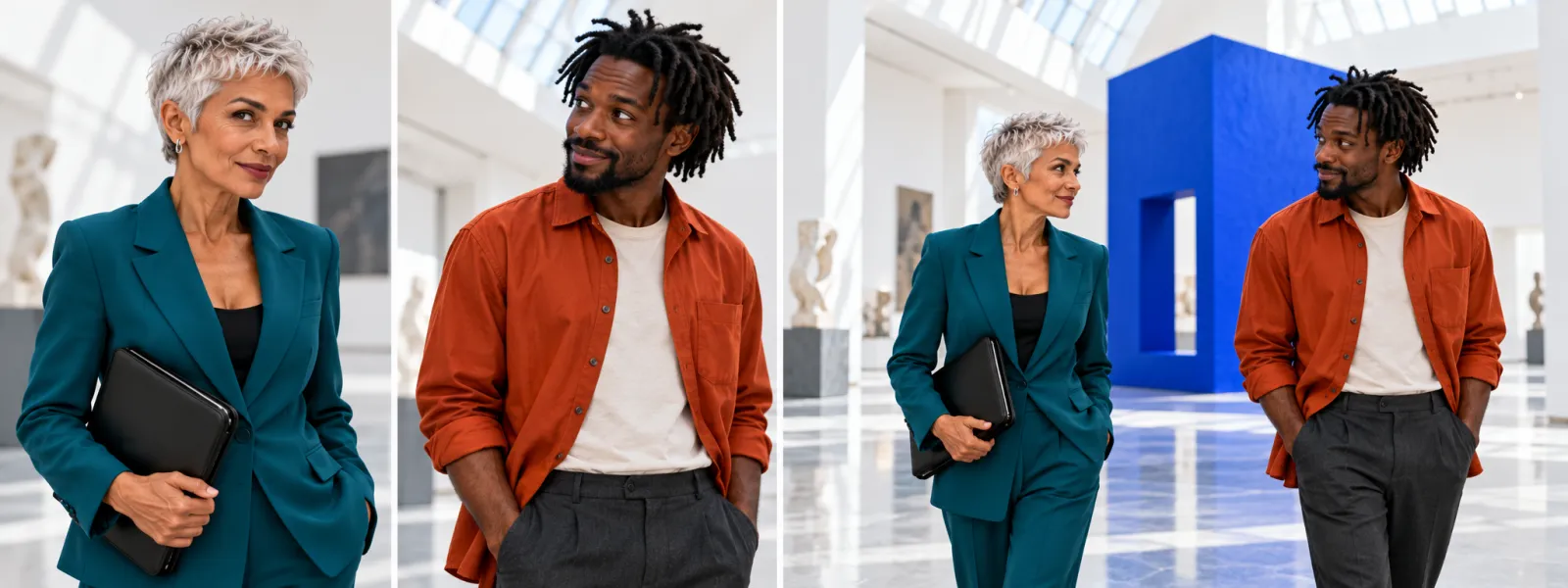
Identity and blocking plan: Inez and Malik have separate portrait references, then share one approved scene composition.
Step 2 Prepare the prop and location separately
The black portfolio belongs to Inez throughout the scene. Fix its size relative to her torso, its closed state, and the arm that holds it. Do not request a handover in the first attempt; that would add a difficult contact event to the identity test.
Prepare an empty museum reference with the blue sculpture, daylight direction, and standing area established. Keep the floor visible enough to judge where both people stand. A crowded location reference can introduce unintended background people or obscure the two leads.
When preparing the shared frame, leave a visible gap between their silhouettes. Keep both faces at a useful size and avoid an extreme near-far arrangement. If one person is much closer to camera, apparent height is a perspective effect and should not be mistaken for a character specification.
Step 3 Write the scene around ownership and position
Name each person before describing their action. State who holds the portfolio, where the other person's hands are, and what each person watches. Repeat a relationship only when it matters; a long list of unrelated constraints can bury the main event.
| Asset | Purpose in the shot | What it does not establish |
|---|---|---|
| Inez portrait | Face hair and age cues | Malik's appearance or scene position |
| Malik portrait | Face hair and age cues | Inez's clothing or prop ownership |
| Museum reference | Space sculpture and light | Extra people or a new camera command |
| Shared starting frame | Initial blocking and scale | Guaranteed identity through motion |
For the establishing shot, use this brief with the supported visual inputs:
Eye-level medium-wide museum shot with exactly two adults. Inez, silver pixie hair and teal suit, stands screen-left holding one closed black portfolio against her left hip. Malik, short locs and burnt orange overshirt, stands screen-right with both hands relaxed. Malik shifts his gaze from the portfolio toward the blue sculpture; Inez remains still. Preserve each person's distinct face, hairstyle, outfit, position, and prop ownership. Fixed camera, steady daylight, no handover, crossing, duplicates, or additional people. End with both looking toward the sculpture.
The prompt describes one small action. If both characters move independently, turn fully, and exchange the prop at once, the review becomes harder and there are more opportunities for the scene to become confused.
Step 4 Generate the shared shot before the coverage
Start with the approved two-person composition. Confirm each required file is attached through the selected model's supported input control. If a reference cannot be supplied, do not leave a filename in the prompt and assume the model can access it.
Choose a short available duration that allows the gaze shift to settle. Record the model, settings, reference files, and prompt. Generate one version, then inspect it before producing the reaction shots. Keep the camera fixed during this first identity test.
If the result introduces a third person, first inspect the starting composition and reference layout. If the people exchange outfits, make their assignments clearer and reduce simultaneous movement. If only the final portion drifts, see whether an earlier valid cut still completes the action.
Step 5 Check both people before continuing
Watch each character separately through the full clip, then watch the pair together. This catches details that are easy to miss when the eye follows only the person moving.
- Compare the face and hair of Inez with her approved portrait.
- Repeat the comparison for Malik, including his hair silhouette.
- Check that the teal suit and orange overshirt remain with their owners.
- Count exactly two people at the beginning, middle, and end.
- Track the portfolio and both characters' hands through any occlusion.
- Compare screen position, eyeline, and lighting with the next planned shot.
Reject an attractive take if it quietly changes one person. For a small fault, revise the suspected input or action first. Keep the accepted version and the rejection reason so the next attempt has a clear purpose.
For an occlusion test, note the frame immediately before Malik turns away and the first frame where his face returns. Compare his hairline, nose, collar, and overshirt seams with the approved view. Then play through the transition. A pair of acceptable stills can hide an unstable face between them.
Before approving the sequence, have another reviewer identify who owns the portfolio without reading the prompt. If the answer is unclear, check the framing or action rather than relying on a longer written explanation. The scene should communicate that relationship through the picture itself, including at the final delivery size.
Keep the same cast available for another scene
Save an approved identity packet for each person, plus a shared continuity note. Record the portfolio owner, hair, outfit, and museum layout. An accepted frame from this scene can help with later visual planning, but do not treat it as automatic identity training.
If the next episode changes wardrobe, make the change explicit and approve the new look before generating several shots. Preserve the underlying face references so a clothing update does not become an accidental recast.
Use the AI video workflow guide to keep references, takes, and editing decisions connected across the project. A reusable folder is only helpful when its approved contents are clear.
Alternative preserve an existing performance
If you already have a usable two-person performance, first ask whether it needs replacing. You can keep that footage, add establishing coverage, and edit around the existing action. This avoids regenerating good movement merely to make every shot follow the same production route.
If the task genuinely needs motion transfer, verify a tool that supports the source format, identity inputs, and intended change. Test a short section. Do not assume a general video generator reproduces the exact choreography of an attached performance.
For this museum scene, existing footage of a glance or nod may be enough to establish the rhythm before any generated coverage is selected.
Alternative repair only the affected coverage
If Malik's close-up is unusable but the shared shot and Inez's reaction work, regenerate Malik's coverage first. Keep the same eyeline, background, and light direction so it still belongs to the scene.
A local face or character replacement requires a tool whose actual video-editing controls have been checked. A single corrected still does not fix neighboring frames. Inspect the complete edited interval and the other person before accepting any targeted change.
You can also shorten the shared shot and cut to separate reactions. That is a storytelling choice with a predictable editing route, especially when two moving bodies keep interfering with one another.
What to include in the production budget
Budget for two identity packets, a location, the shared composition, video attempts, and finishing. Count accepted shots rather than assuming that one generation supplies each deliverable.
| Work item | Planning example | What to record |
|---|---|---|
| Identity preparation | Two people with portrait and body views | Approved files and rejected versions |
| Scene preparation | One museum and one shared frame | Composition revisions |
| Video | Three shots with two attempts each | Six planned attempts plus actual usage |
| Finishing | One thirteen-second sequence | Editing sound and any replacement shots |
This is a workload example, not a PixTV price quote or success-rate forecast. Check the displayed cost of the actual model settings. Repeating a failed shared shot many times may cost more than changing the coverage plan.
Where the approach still needs judgment
References reduce ambiguity; they do not guarantee identity under every turn, occlusion, or lighting change. Similar-looking characters, crossed bodies, small faces, and complex hand interactions require closer review. A portrait that works for one angle may not establish an unseen profile.
Dialogue adds another layer: voice assignment and mouth movement must agree with the intended speaker. Keep the first identity test silent, then verify any audio or lip-sync route separately. Do not assume those controls come with every model.
Once the cast holds, assemble the accepted coverage in PixTV video editing or your editor. Open PixTV with two approved identities and one simple shared action before expanding the scene.
Frequently asked questions
Is one picture of both characters enough
It can establish a shared starting composition, but it may not provide enough facial detail for both people. Keep separate approved identity references available. Use them where the selected model supports that input, and inspect the shared frame before asking it to move.
Should I use a character sheet or one portrait
Use the format the selected model handles clearly. A sheet is useful for planning and checking several angles, but it may be interpreted as multiple figures. If that happens, prepare a single identity image or a composed scene frame instead of repeating the same sheet.
How do I stop the characters exchanging clothes
Assign each outfit to a named person and keep the same assignment in every brief. Check the starting image, simplify simultaneous movement, and track each person through occlusions. If the swap appears only after a turn, test a smaller turn before changing several inputs.
Can I keep two people without a shared action shot
Yes. Establish their relationship with a short two-shot, then use separate close-ups, reactions, or over-the-shoulder coverage. Match eyelines and screen direction. The audience can follow a conversation or shared task without watching both characters perform every movement in the same frame.
Does saving the reference train a permanent identity
Saving an image or folder is an asset-management step. It should not be described as training unless the product offers and documents a training workflow. Keep the approved files reusable, attach them through supported controls, and continue to check the cast in every new shot.
What should I test before adding dialogue
Check that both faces, outfits, positions, and prop ownership hold through a silent shared action. Then verify the sound and mouth-movement workflow for the chosen model or editing tool. Review who speaks and who reacts so audio does not introduce a new identity or role mistake.
