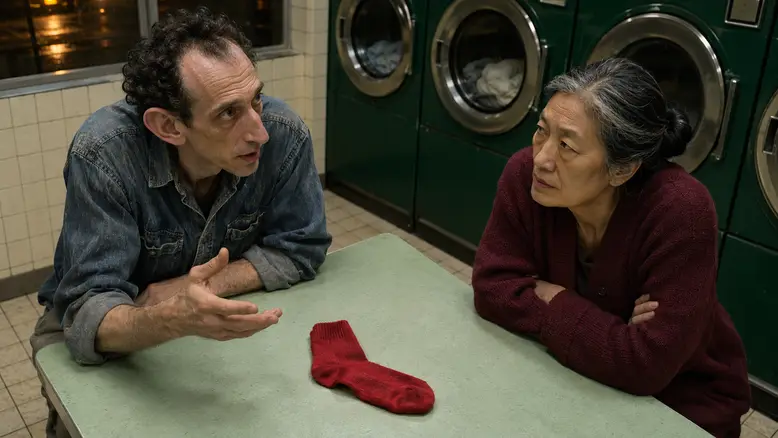
Plan an AI dialogue scene by separating the conversation into speaker turns, establishing where both people sit, and preparing a matching angle for each character. Generate the necessary performances as individual shots, then build the exchange around the approved audio. Shot-reverse shot works when the audience understands who is speaking, who is listening, and what changes between them.
Why two speaking characters can feel like separate videos
Two accurate faces do not automatically create a conversation. If both characters look into the lens, the scene reads as two presentations. If their eyelines point the same way, they may appear to sit beside each other. If a reaction arrives before the question, the edit changes the meaning of the exchange.
Identity, geography, performance, and sound are separate production decisions. Keep a reference for each person, a shared plan of the space, a short direction for each turn, and an audio record identifying every speaker. A single paragraph describing two people talking leaves too many of these relationships unresolved.
The first review should therefore happen between two still frames. Place the planned close-ups beside one another and ask whether they could belong to the same table. Match camera height, background landmarks, light direction, and gaze. Solve a spatial contradiction before paying for movement.
Choose a route that fits your starting material
The most controlled route depends on what you already have. A finished dialogue recording, a silent visual sequence, and an unrecorded script need different preparation. Choose one route for the first scene so changes remain easy to trace.
| Starting material | Practical route | Check before production |
|---|---|---|
| A short script | Record or approve the voices, then plan coverage | Each line has a named speaker and a visible consequence |
| Final dialogue audio | Build shots around the actual pauses and turns | Timing and permission for the recording are settled |
| Silent character shots | Use narration, offscreen speech, and listening reactions | The pictures do not pretend to show unsupported lip sync |
| An existing performance | Preserve the useful footage and add only missing coverage | You can use the footage and the cut still makes sense |
A close-up per spoken line is one possible structure. It is not a requirement to cut after every sentence. Stay on the listener when their changing expression carries more information than another view of the speaker.
Keep references and shot preparation together in PixTV
Use image generation to prepare the two character angles and a shared establishing view. Approve these as a set. The two-character consistency guide covers the underlying identity and blocking work; this workflow concentrates on the exchange between shots.
Move an approved composition into video generation when your selected model accepts that input. Confirm the current audio and reference controls before choosing a visible speaking performance. A general video entry point does not establish dedicated lip-sync support.
Keep accepted takes, dialogue files, and shot notes together for the video editing workspace. Check which finishing controls are available. If the required sound operation needs another editor, retain the same shot names and audio versions during that handoff.
The missing red sock scene
The original scene plan follows Viktor and Mei in a laundromat at night. Viktor has a long face, receding dark curls, and a faded denim shirt. Mei has a rectangular face, hooded eyes, a compact grey-streaked bun, and a burgundy cardigan. Their appearance differs before wardrobe enters the comparison.
A single red sock sits on the pale mint folding table. Viktor assumes Mei knows its owner. Her answer reveals that he has been guarding someone else's laundry. The scene needs a small change of understanding, not elaborate movement or a new location.
| Turn | Suggested dialogue | Coverage decision |
|---|---|---|
| Viktor | Did you leave this here? | His close-up looking toward Mei |
| Mei | The sock? No. | Her reply, followed by a brief listening hold |
| Viktor | Then whose machine am I watching? | His question with the table edge still visible |
| Mei | Mine is the one behind you. | Her answer or Viktor beginning to understand |
| Viktor | I have been waiting for the wrong load. | A restrained reaction rather than another large gesture |
| Mei | At least the sock has company. | A shared view to finish the exchange |
Read the lines aloud before assigning durations. The six turns describe editorial beats, not six mandatory generation requests. A usable take can cover more than one moment if it supports the intended cut.
Step 1 give each character an independent reference
Save a clear view of each face and a matching upper-body reference. Note the features that make Viktor and Mei different: facial outline, eye spacing, nose shape, age markers, posture, and build. Hair and clothing help continuity but should not be the only distinction.
Use a neutral expression as the main identity reference. An exaggerated open mouth or distorted wide-angle portrait can make later expressions harder to judge. Prepare the relevant face angle before attempting a speaking close-up.
When the chosen workflow accepts multiple references, identify their separate jobs. A face reference establishes identity; the planned frame establishes composition. A sheet containing several views is not an instruction to place several copies of the person in the scene. Inspect the resulting frame for the intended head count.
Step 2 establish the table before reversing the angle
Draw a simple line between the two seats. Keep the first pair of cameras on the same side of that line. Viktor can look screen-right while Mei looks screen-left, making their attention feel reciprocal. Reversing that screen relationship without a clear transition can make the conversation disorienting.
Use the washer doors, window, and table edge as landmarks. Do not demand that both close-ups have an identical background: they face different directions. Instead, each background should be possible from its camera position in the shared room.
Keep the red sock in one place until someone moves it. Record which side of the table it occupies and whether it should appear in the crop. A prop that jumps between turns can make an otherwise accurate conversation feel assembled from unrelated scenes.
Step 3 write each shot around one change
Start each direction with the visible character, framing, gaze, and action. Add the elements that must remain fixed. Keep spoken text in a separate field or note unless the selected workflow explicitly supports assigning dialogue inside the generation brief.
For Viktor's opening, a visual brief could read:
Medium close-up of Viktor at the mint folding table. He looks toward Mei offscreen right, glances at the red sock, and returns his gaze to her. Keep his denim shirt, face, camera height, and laundromat lighting unchanged. One small movement, steady camera.
Mei's reverse angle should answer that same setup, not introduce a fresh camera style. Describe her looking offscreen left and holding a measured expression. The specific performance can change while the room and visual relationship stay stable.
Avoid combining a turn, a large hand gesture, a laugh, a camera orbit, and a long sentence in one short take. Each additional action creates another point where identity, timing, or contact can fail.
Before generating, label the audio by speaker and turn. For the red-sock scene, save Viktor's opening question separately from Mei's reply, or mark their positions in the approved recording. Keep a short note identifying which picture is intended to sit over each sound. This prevents a later replacement take from being matched to an outdated line.
If the edit stays on Mei while Viktor asks the question, her mouth should not appear to deliver his words. Choose a listening performance with enough settled time to accommodate the line. Offscreen speech still needs credible spatial placement and consistent sound; it is not a reason to ignore the relationship between the speakers.
Step 4 generate enough room around the exchange
Generate one difficult pairing first: a question and the reaction it causes. This tests whether the characters look toward each other and whether the scene can cut naturally. Approving every attractive shot in isolation misses that relationship.
Leave a settled moment before and after the intended action. These handles let the editor choose a cut without freezing a face or repeating the end frame. The useful duration comes from the actual performance and dialogue timing, not the maximum length a model can generate.
For visible speech, test the selected speech workflow with a short line before producing the whole exchange. Compare the mouth timing, spoken words, voice assignment, and face. If it cannot carry the line reliably, redesign the coverage around offscreen speech and listening reactions instead of presenting a mismatched mouth as finished dialogue.
Run a rough assembly using only the approved question and reaction. Listen once without watching, then watch once without sound. The first pass exposes a confusing voice assignment or interrupted phrase. The second shows whether the eyelines and expression changes communicate a plausible exchange. Recombine them and adjust the cut before adding further coverage.
Keep the room's background sound consistent across the exchange. A sudden change in ambience can announce the edit even when the pictures match. Use the sound tools available in the chosen finishing workflow, and check that any recorded or sourced ambience is cleared for use. The aim is a shared space the audience can follow, not a different atmosphere on every reverse angle.
Step 5 review both people and the cut
Check each take against its character reference, then check the two takes together. A frame can pass the face review and still fail the scene because the light, gaze, or camera height changes at the cut.
| Review layer | Question | Reject or revise when |
|---|---|---|
| Identity | Is this still the intended character? | Face, body proportions, or wardrobe drift |
| Geography | Could this angle exist in the same room? | Landmarks or screen direction contradict the plan |
| Performance | Does the expression follow the previous turn? | A smile or surprise arrives before its cause |
| Audio | Who says the line and where does it end? | Voices swap or speech is cut unnaturally |
Watch at normal speed, then inspect the transition frame by frame. Normal playback reveals awkward pauses; individual frames reveal a hand or sock changing position. Keep a problem attached to the affected shot rather than rewriting the whole scene at once.
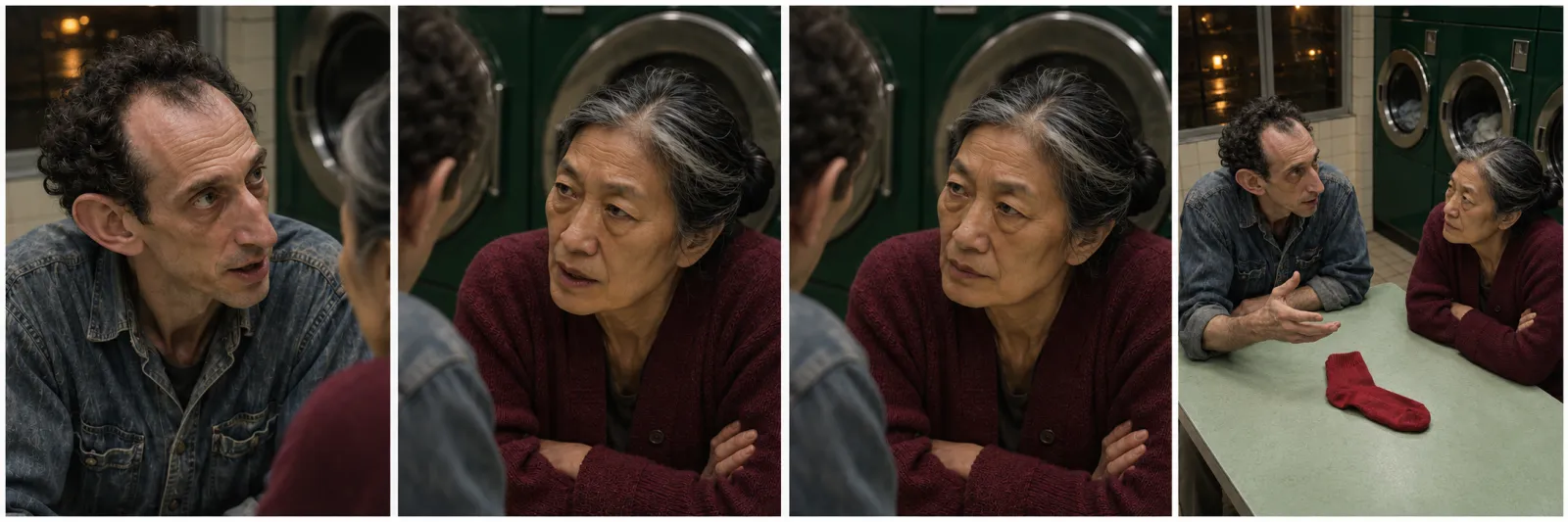
Coverage plan: speaker, reverse angle, listening reaction, and shared view each have a separate editorial purpose.
Reuse the approved setup within this story
Save the two approved angles, the room layout, character references, dialogue version, and accepted shot IDs as one scene package. A later line in the same laundromat can reuse the setup while changing the performance. Compare it with the original references, not only the latest generated frame.
Reuse supports continuity within a story. For a different campaign, design the cast and setting around its message. Renaming Viktor or changing Mei's cardigan does not by itself create a distinct creative direction.
If the camera or blocking changes, make a new shared view first. A character moving to another seat changes the geography; continuing to use the previous left-right notes without revision produces a contradiction that extra identity references cannot repair.
When the performance already exists
Use an accurate recorded performance when it already carries the timing and interaction you need. Missing coverage may require only a prop insert or a listening shot. Regenerating both people can add work without improving the conversation.
If you are considering a performance-transfer or recasting tool, verify that specific capability and the permissions for the source footage before designing around it. Those operations are distinct from ordinary image-to-video generation. Review both people and the surrounding action after any change.
When one shot needs replacement
Replace the smallest unit that has actually failed. A changed face needs an identity correction; a reversed eyeline needs a new composition. A pause that runs too long may need only a tighter edit.
Match the replacement to the accepted neighboring shots: camera height, light, pose at the cut, and audio version. Keep the usable original until the replacement has passed the same review. A newer take is not automatically a better match for the sequence.
Estimate work by usable coverage
Count the required visual setups, voice work, attempted takes, and assembly separately. As an illustrative workload, four setups with three attempts each mean twelve video attempts before additional corrections. That is not a PixTV quote or a predicted success rate.
Use the selected model's displayed cost, then allow for reference preparation, audio, discarded takes, and editing time. A longer generation is useful only when it produces coverage the scene can use. Approving one question-and-reaction pair first reduces the uncertainty in the remaining work.
Keep the conversation within what the footage can show
A correct face does not prove lip sync, a reference does not guarantee identity, and a written emotion does not establish a readable performance. Judge the relationship between the shots and the final sound, not only the prompt.
Start in PixTV with one short exchange. Use the storyboard workflow to approve the geography, then make the question and its reaction work before expanding the scene.
Frequently asked questions
Does every line need a different shot?
No. Hold on the speaker when their delivery matters, or stay on the listener when the reaction changes the scene. A cut should reveal useful information or shape timing. Switching mechanically after every sentence can make a short exchange feel repetitive even when the individual shots are attractive.
Can both characters look at the camera?
They can when the story deliberately addresses the viewer. For a conventional conversation, their gazes should usually imply attention toward each other. Approve the two angles together and check the shared room before generating movement, because separately plausible portraits can still create contradictory eyelines.
What if my workflow cannot synchronize a speaking mouth?
Use offscreen dialogue, narration, prop inserts, or a listening reaction that does not show the speaker's mouth. Confirm the actual audio and lip-sync options before choosing visible speech. A character reference supplies appearance; it does not automatically supply synchronized dialogue or a consistent voice.
Can I use one picture of both people?
It can establish blocking, but separate approved views make each identity easier to inspect. Match the references to the chosen model's actual input controls. If it accepts only one starting frame, prepare that frame carefully rather than assuming several character references can also be attached.
Why does the reaction feel early?
Check the sound and picture together. The answer, pause, and expression may not follow the same timing. Move the reaction later or use a calmer take, then review the exchange at normal speed. Do not add more visual motion to compensate for a timing problem.
What should I test before producing the full conversation?
Test the hardest question-and-reaction pair with the intended audio. Review identity, gaze, geography, voice assignment, and usable room around the cut. That small sequence exposes the production dependencies more clearly than a single polished portrait, and gives you a practical basis for planning the remaining coverage.