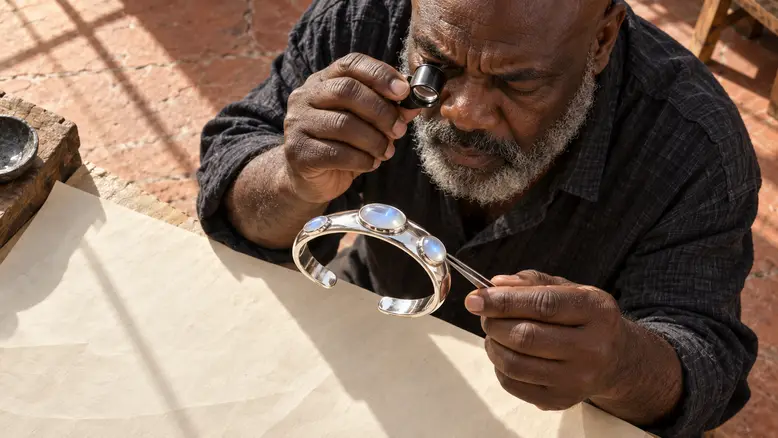
Build an AI jewelry video around the features a shopper needs to recognize: the silhouette, stone count, settings, opening, and metal finish. Start from accurate product references, use small movements, and check the whole clip against those details. A flattering reflection is useful only while the object underneath remains the same piece of jewelry throughout the usable shot.
Why jewelry needs a stricter motion brief
Jewelry contains small features that carry a large part of its identity. An extra stone, a closed cuff opening, or a changing bezel can create a different item even when the overall color still looks right. Movement also shifts reflections, so the review has to separate a changing highlight from changing metal geometry.
The original case here is a polished silver open cuff with three oval moonstones. Adewale, an older artisan with a shaved head and salt-and-pepper beard, examines it in a terracotta-toned atelier. The setting supplies a craft story; the cuff supplies the product identity. Keep those two jobs separate when directing the shots.
Prepare the product before choosing a move
- Gather a clear overall view, an opening view, and close details of the settings.
- Record stone count, arrangement, metal color, and the reference's proportions.
- Mark hidden surfaces that your current photographs do not establish.
A highly reflective image is not automatically the best reference. Use a view where the silver edges and stone boundaries can be distinguished. If glare hides the opening, solve that ambiguity before asking for motion.
Use PixTV to prepare and direct the shots
Prepare compositions through image generation, then compare them with the real product references. Keep an accurate approved image as the motion input where video generation supports it. Select the model and controls according to the current panel.
Organize accepted clips in the video editing workspace, checking which finishing operations are available. The single-photo product workflow covers the wider route. Jewelry adds a finer inspection of the same asset handoff.
Choose between a simple reveal and a detail sequence
Route A: one restrained product reveal
Use a single reference and a small movement that stays close to the known angle. For the cuff, a slight camera slide over the paper can reveal the three stones without requiring an invented rear view. Leave a settled beginning and ending so the editor can choose a stable interval.
Keep the light source fixed in the brief. Let the camera movement change the reflections naturally. Asking for a rotating cuff, moving camera, pulsing light, and shifting background at once makes it harder to identify the cause of an error.
Route B: a sequence of controlled details
Plan separate overall, setting-detail, and artisan shots. Each can begin from its own approved reference. The setting close-up does not have to reveal the entire bracelet, but the part it shows must belong to the same piece.
An example overall-shot brief is:
The silver open cuff rests on cream paper. A small camera slide reveals its arc and three oval moonstones. Preserve the open gap, bezel shapes, and stone positions. Warm atelier light stays fixed. The cuff remains still.
For the macro, ask for a stable view of one existing setting with a gentle focus change if the model can follow it. If that changes the bezel, use a fixed close-up instead. A simple accurate shot is more useful than a sophisticated move that redesigns the object.
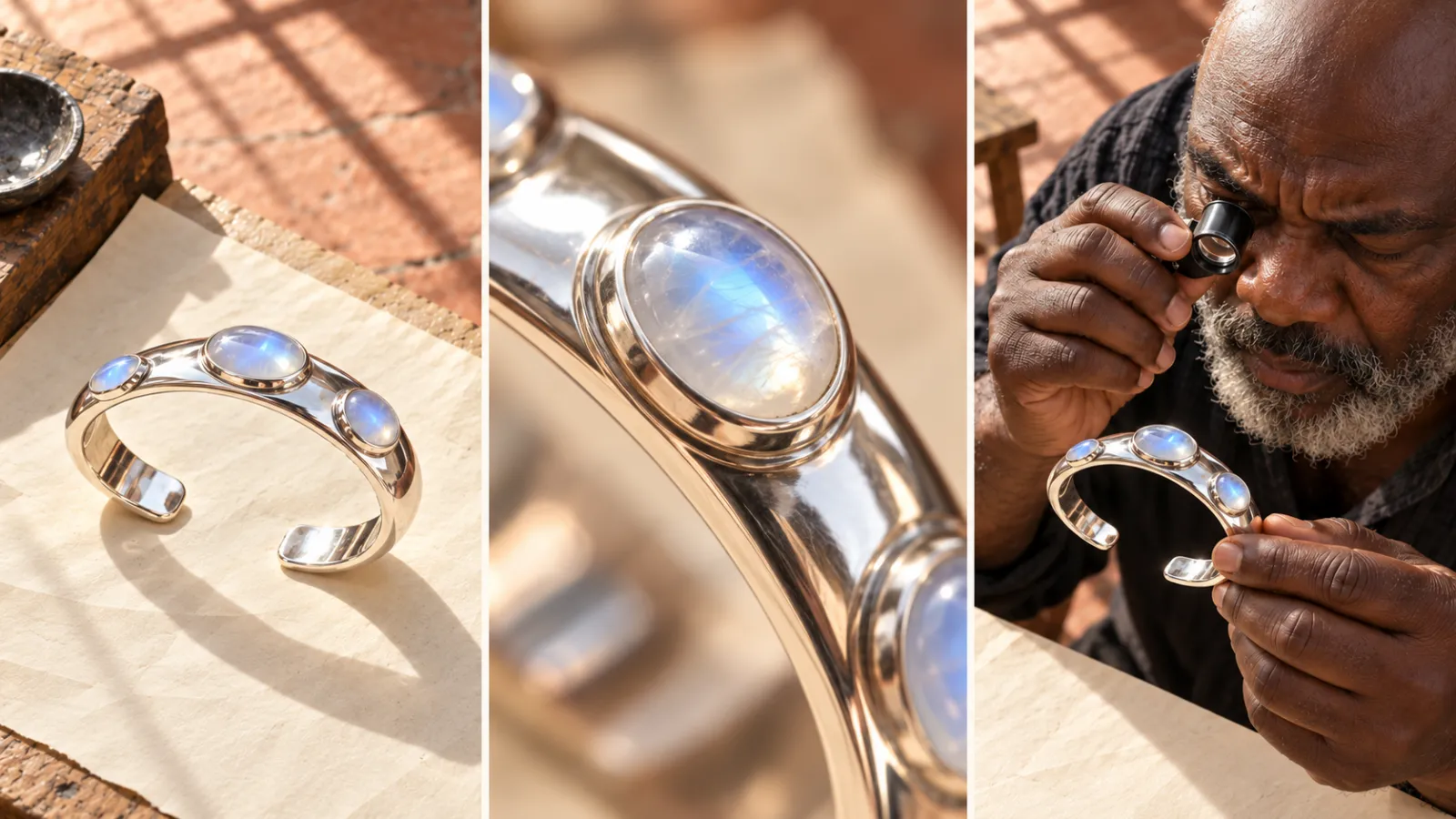
Product-reference and shot plan: the overall structure, one setting, and the artisan context receive separate coverage.
Add a person only when the interaction is clear
Adewale's inspection gives the object scale and a reason for a close view. Direct a small hold, not a complicated handover or a full turn through his fingers. The product should remain visible rather than disappearing behind a dramatic gesture.
If the ad needs a wearing shot, prepare a genuine reference for fit and orientation. Do not infer size from an oversized conceptual cover or ask the model to guess how a cuff opens around a wrist. A new human interaction creates another set of contact and scale checks.
Match each view to a review question
| Shot | What it establishes | What to inspect |
|---|---|---|
| Overall | Which piece is being shown | Open gap and three-stone arrangement |
| Setting detail | How one feature is built | Bezel edge and stone boundary |
| Artisan view | Scale and handling context | Grip, proportions, and visible design |
Review product color under a consistent display condition. Silver can pick up warm surroundings, but a highlight should not become a different metal finish halfway through the shot. Compare the moving interval with the same source material, not with a memory of the first frame.
Keep the advertising message attached to visible facts
Open on the feature the shot can actually show: three oval stones, an open silhouette, or an artisan's inspection. Add product names and factual details as editable text in finishing, where they can be corrected without regenerating the footage.
Material origin, stone treatment, dimensions, and craftsmanship claims need their own reliable product information. A generated atelier does not prove that a real item was handmade there. Keep an imagined setting separate from what you assert about the item for sale.
Budget for detail checks and rejected takes
| Stage | Include in the estimate |
|---|---|
| Reference preparation | Clear views and design corrections |
| Motion | Every attempt, including changed products |
| Review and assembly | Frame inspection, edit, and text work |
Use the current selected settings' displayed cost. Reserve review time for the small features that make the piece identifiable; low generation cost does not make a wrong setting acceptable.
Check the piece before approving the edit
Count the stones through the usable interval. Inspect the cuff opening, continuous silver edges, settings, hand contact, and apparent scale. If a failure appears, simplify the move or replace that shot with accurate recorded material. Preserve the correct product even if the resulting edit is quieter.
Start with one overall view in PixTV and approve its moving details before expanding the sequence.
Frequently asked questions
Is one photograph enough?
It can support a limited move near the known angle. Hidden settings, the back of the piece, and wearing fit need reliable references. Gather additional views when the planned camera movement reveals otherwise unknown information.
Why does the stone count change?
Small repeated details may be reconstructed inconsistently. State the count, provide a clear reference, and inspect the usable interval. A correct opening image does not guarantee the same number survives a turn or hand movement.
Should I use a full orbit?
Only with suitable references and a result that preserves the design throughout. An orbit reveals surfaces one photo may hide. Begin with smaller movement, check edges and settings, then expand when the additional angle contributes useful information.
Can AI show wearing fit?
You can plan a wearing scene, but reliable fit needs accurate scale and references. Check wrist contact, opening orientation, and proportions. A generated wearing image is not a measurement or a guarantee of real-world fit.
Where should I add product text?
Editable text in finishing is easier to correct consistently. Preserve important existing marks from accurate references. Check names, dimensions, prices, and other details against product information before they enter the advertisement; legibility does not establish accuracy.
What if a few frames look wrong?
Use a clean interval only if it still completes the intended shot and cuts naturally. Reject a take when the important reveal changes the design. Even a brief incorrect stone or setting can misrepresent the item.