
Character consistency starts before the second image. Create an identity reference you are willing to keep, define the details that must survive, and return to that reference for each new scene. A repeated name in the prompt helps organize the project, but it does not replace a visual reference.
This guide follows Elara, a fictional adult character with a sleek dark-auburn high ponytail, a white jacket with green piping, and an orange star brooch. The working set includes a neutral portrait, a full-body view, a tram shelter, and a record shop. Each image tests a different part of the same identity rather than introducing another face.
Find the source of the drift
Face shape, hair construction, wardrobe, and lighting can change independently. An auburn hairstyle may remain recognizable while the jaw becomes narrower. A similar face may still wear the wrong jacket. Review those categories separately before deciding what needs repair.
| What changed | Likely weak point | First adjustment |
|---|---|---|
| Jaw or eye spacing | Identity reference was weak or underused | Return to the clearest portrait |
| Outfit details | Wardrobe description was incomplete | Specify and compare visible anchors |
| Skin appears different | Light or grading changed | Check under neutral light |
| New scene feels like a new person | Several variables changed together | Test one scene change at a time |
Avoid judging identity only from hair color. Compare the eye spacing, nose bridge, chin, and overall facial proportions. Those cues are more useful when a camera angle or expression changes.
Strategy one Approve a readable identity reference
Use the PixTV image canvas to make a neutral portrait in GPT Image 2.6. Keep the face large enough to inspect, the hairline visible, and the light uncomplicated. Save the accepted result before trying an elaborate environment.
Elara's reference has a delicate oval face, elegant cheekbones, almond-shaped hazel eyes, fine straight brows, and a defined cupid bow. Her long dark-auburn hair is tied into a sleek high ponytail. Those facial and hair cues should remain legible when the background changes.

Approved visual anchor. Inspect the actual face rather than relying on the character name alone.
Strategy two Write a short identity and wardrobe block
Record a compact description beside the reference. Separate permanent cues from scene instructions so a new location does not accidentally rewrite the character. Use details you can actually see in the source.
Elara is the same adult woman as the attached reference. Preserve her oval face, cheekbones, hazel eye shape, fine brows and defined cupid bow. Keep the sleek dark-auburn high ponytail and curved front lock. Preserve the white cropped jacket with green piping, two collar snaps, orange star brooch and tailored teal trousers.
Do not keep adding flattering adjectives to correct drift. “More beautiful” or “more cinematic” can push the face toward a different interpretation. Describe the specific proportion or visible detail that must stay instead.
Strategy three Add the view your next shot needs
A portrait explains the face but may not explain shoes, jacket length, or trouser pockets. Generate a full-body study from the accepted portrait and compare it before using it as another reference. A newly generated view can introduce errors of its own.
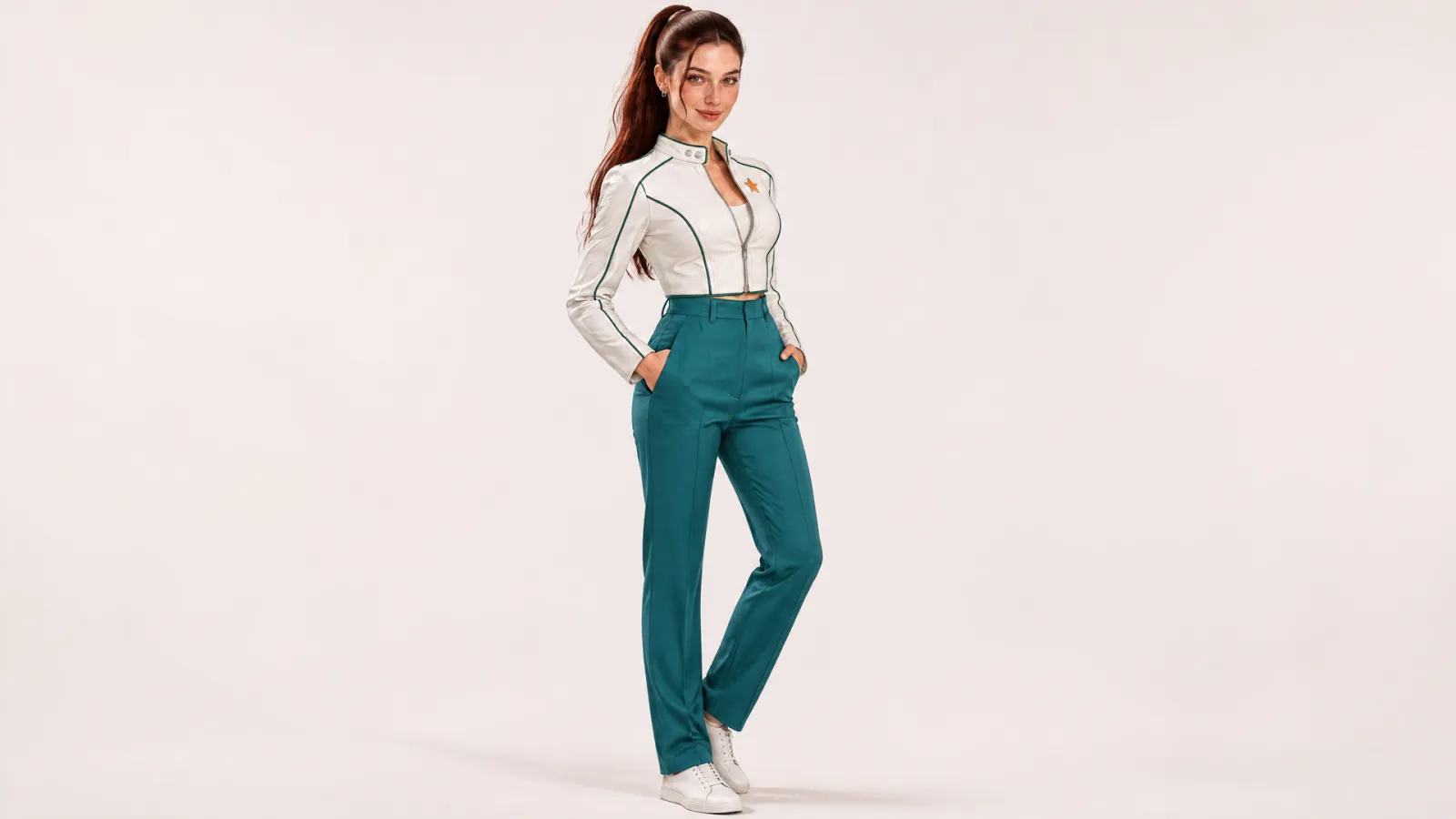
A separate full-body study adds clothing proportions and footwear. It is an additional checked reference, not proof that every future view will match automatically.
Choose a small useful reference set rather than an unfiltered folder. Keep the portrait for facial identity and the full-body image for outfit structure. If two references disagree, resolve the disagreement before asking the model to interpret both.
Strategy four Change the environment first
Begin with a scene that keeps the face readable. The tram-shelter study changes the location and body framing while retaining the same outfit. Reference the accepted portrait directly instead of describing Elara from scratch.
Use the attached Elara reference for the same identity and wardrobe. Place her in a pale mint tram shelter under bright overcast daylight. Medium thigh-up view, looking screen-right, relaxed closed mouth. Keep the face, auburn ponytail, green jacket piping, two collar snaps and orange star brooch. No other people or readable signs.

First scene change. Compare the facial proportions, ponytail construction, jacket piping and brooch with the neutral source.
After that scene passes review, try the record shop from the original reference. Change the pose, location, and light deliberately. Keep the face uncovered so a new activity does not make identity impossible to judge.

Second scene study. The warmer environment and new pose make facial and wardrobe comparison especially important.
Strategy five Repair the failed detail
If a scene has the right composition but the wrong collar, make a focused correction from the best relevant reference. If the face has drifted substantially, return to the identity source rather than repeatedly editing the drifting face. Choose the repair according to the actual failure.
Keep rejected candidates outside the approved reference folder. Otherwise, the next generation may use the very error you intended to remove. Version the files so the team can tell which portrait and wardrobe view are current.
Build a scene set you can compare
Arrange the approved portrait, full-body study, and scenes together. Review at similar face sizes as well as in the full composition. A large foreground portrait can appear more convincing simply because its details are easier to see.
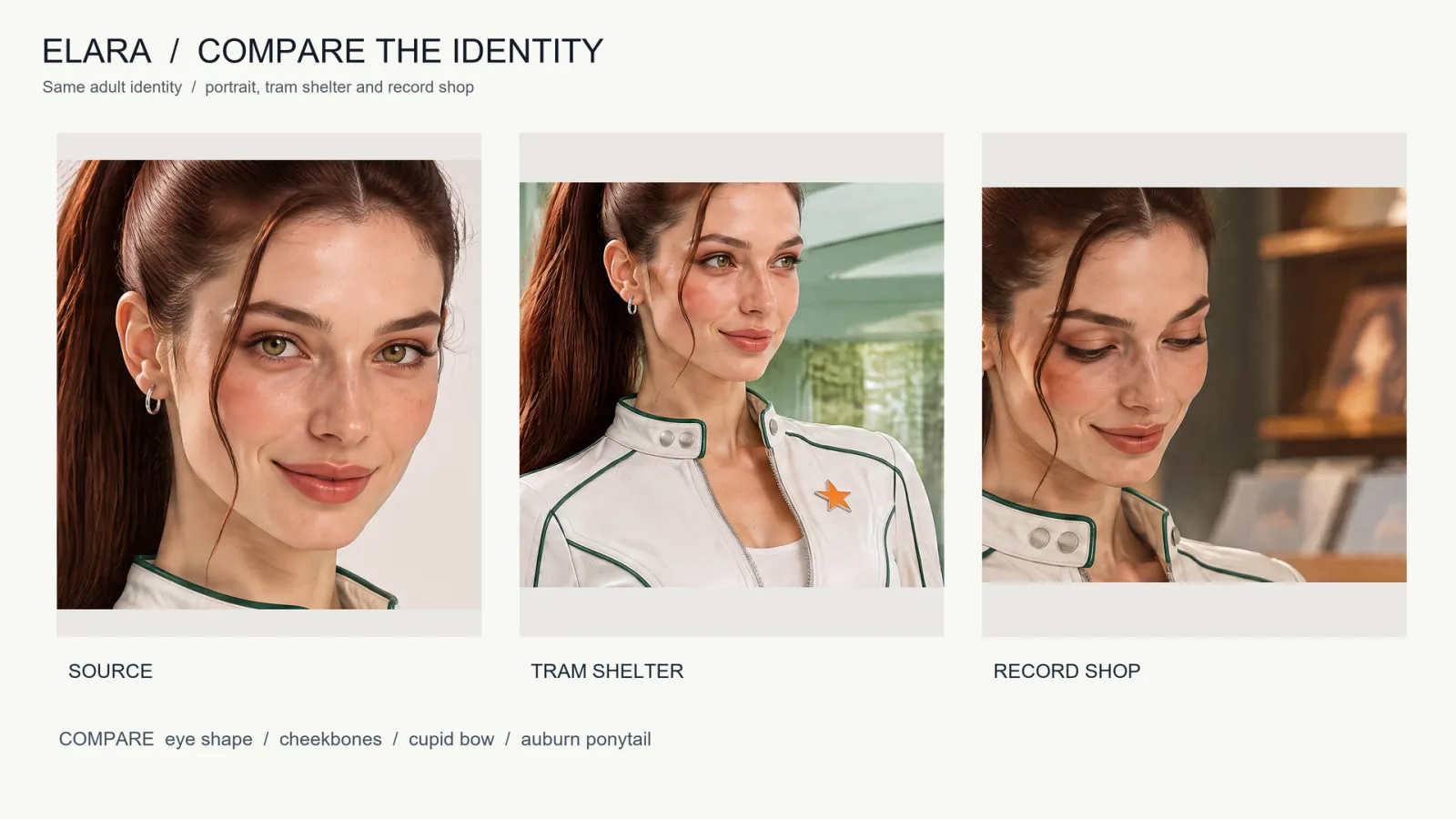
Comparison crops from the supplied outputs. These are review aids, not a biometric similarity score.
Check the face before color grading, then inspect the brooch, collar snaps, and green piping. Record an accepted variation, such as a different expression, separately from an error. This keeps “consistent” from becoming a vague instruction to make every picture identical.
Make the approval decision scene by scene. If the tram shelter works and the record shop does not, retain the successful shelter image while revising the other. Avoid replacing the whole set just to repair one failure. Note which reference was attached, what changed intentionally, and which detail failed. Those three observations make the next prompt more precise than asking for general consistency again.
Move the accepted character into video
Take the approved scene still into the PixTV video canvas. Describe one readable action and keep the identity cues explicit. A successful still set does not guarantee that a moving face will remain stable through every frame.
Review the full clip, including turns and partial occlusions. Use the PixTV clip editor to arrange accepted shots for a sequence. Keep the reference set beside the edit so continuity checks use the same visual standard throughout the project.
Keep the reference set small and current
Start with one accepted portrait, one checked wardrobe view, and a scene you can inspect clearly. Save prompts and approval notes with those files. Budget for reference creation, scene attempts, and targeted repairs using current account credits rather than assuming every first generation will be usable.
Return to the PixTV image canvas for the next scene with the same reference block. Expand the set only when a new angle or action needs information the existing references cannot provide.
Frequently asked questions
Does giving the character a name lock the identity
No. A name helps organize prompts and files, but it does not establish a trained identity. Use a clear visual reference and compare the actual outputs. This tutorial uses image references; it does not demonstrate a separate character-training feature.
How many reference images should I use
Start with the smallest set that explains the task: a clear face and, when needed, a checked full-body view. More images are useful only when they add reliable information. Conflicting hair, facial proportions, or clothing can make the intended identity less clear.
Can I keep the face and change the outfit
Yes, describe the new outfit as the intended change while preserving the facial reference. Approve the new wardrobe separately before making a scene series. Do not treat an accidental costume change as proof that the face has also changed.
Why does the same face look different under warm lighting
Light direction, white balance, shadows, and expression affect perceived features. Compare a neutral reference and examine proportions before judging skin color alone. Avoid correcting a lighting difference by repeatedly redesigning the face.
Should I generate every scene from the previous result
Returning to the original approved reference reduces the risk of carrying forward an unnoticed error. A previous scene can provide composition context when useful, but it should not silently replace the identity source. Keep their roles explicit.
Does matching still imagery guarantee consistent video
No. Motion introduces changing angles, expressions, blur, and occlusion. Use the approved still as a starting reference, then inspect the entire generated clip. Reject or repair continuity failures before combining shots into a finished sequence.