
Build an AI anime series reference library before producing the episodes. Save approved character designs, style frames, locations, clothing, and important props with clear names and versions. Every shot should return to those originals. A useful library tells the next person which asset is correct, where it belongs, and what can change without redesigning the series.
Why a consistent character can still belong to an inconsistent series
A character may keep the same face while the surrounding production drifts. A doorway changes shape, the satchel moves to another shoulder, or a soft illustrated world becomes glossy and three-dimensional. The audience reads all of these elements together. Protecting the face alone leaves the rest of the frame unresolved.
The original series concept here follows Pip, a bird postal courier with a slate-blue body, square-ended ochre beak, white cheek patch, cream crest, and mustard satchel. The pilot uses tactile paper-and-gouache styling. The library method also applies to cel-shaded anime: replace the paper rules with your approved line, shadow, and color rules.
| Drift to prevent | Reference to prepare | Decision to record |
|---|---|---|
| Character proportions change | Approved front, side, and useful action views | Beak, cheek patch, crest, tail, and body ratios |
| Rendering style changes | A small set of matching style frames | Edge treatment, shadow shape, texture, and palette |
| The world changes between episodes | Empty location views and a simple layout | Entrances, landmarks, materials, and scale |
| Story props change | Separate views of recurring objects | Shape, size, attachment, and allowed variations |
Five ways to keep the library useful
Approve the design before expanding the views
Start with one accepted design, then create the angles the planned shots actually need. Compare every new view with the original. A folder containing twenty inconsistent interpretations gives the next generation contradictory instructions rather than stronger identity guidance.
Describe the visual language once
Record how outlines, shadows, materials, and color behave. For Pip, cut-paper edges and dry-brush texture belong to the entire world, including the mailbox and bridge. Adding the word anime to every prompt is less useful than carrying a specific approved visual reference into each asset.
Keep a source of truth and a working area
Separate approved masters from experiments. Use names such as character-pip-v01-approved and location-bridge-v01-approved, then keep rejected versions elsewhere. A clear approval record prevents an attractive experiment from quietly replacing the design that previous episodes established.
Compare across episodes
Review a new shot beside the first approved reference, not only beside the preceding episode. Small changes can accumulate gradually. A slightly longer beak in each batch eventually creates a different character even when every adjacent pair seems close.
Record changes with a story reason
A wet satchel or a new jacket can belong to the story. Save the variation as a named state with an episode and shot range. Do not overwrite the dry satchel master, because later scenes may need the original state again.
Organize the assets and shots in PixTV
Use image generation to prepare character views, empty locations, and prop references. Approve them before moving into video generation. Confirm which references your chosen model can accept; a well-organized folder does not itself create an identity-locking feature.
Use the video editing workspace to organize the accepted footage with the available editing controls. Keep the approved asset names attached to each shot during any external handoff. The character reference guide covers individual views; the series library adds their relationships and version history.
Build one small episode before planning a season
Step 1 define the pilot and the returning elements
Give the pilot one visual task: Pip delivers an envelope to the red mailbox beside the bridge. The next episode can use the same character and bridge with a different delivery problem. List what returns before generating additional streets or costumes.
Step 2 create the core asset set
Prepare Pip's approved views, the satchel, the mailbox, and an empty bridge view. Include a small style sheet showing the established cream, sage, slate-blue, and rust palette. A color swatch alone cannot explain the brush texture or the proportions of the buildings.
Step 3 map assets to the episodes
| Asset | Pilot | Second episode | Third episode |
|---|---|---|---|
| Pip approved design | Use | Use | Use |
| Mustard satchel | Dry | Dry | Named wet state if the script needs it |
| Bridge location | Establish | Return from a new approved angle | Use only if required |
| Red mailbox | Delivery target | Background landmark | Reuse or omit according to the story |
The table prevents unnecessary asset creation. It also shows where a new view or state needs approval before its first appearance.
Step 4 build the shot board from the library
For each shot, name the character version, location, prop state, framing, and one action. A brief might direct Pip to land beside the mailbox while keeping the beak shape and satchel attachment stable. Do not ask the same shot to establish a new location, change costume, open the bag, and fly away.
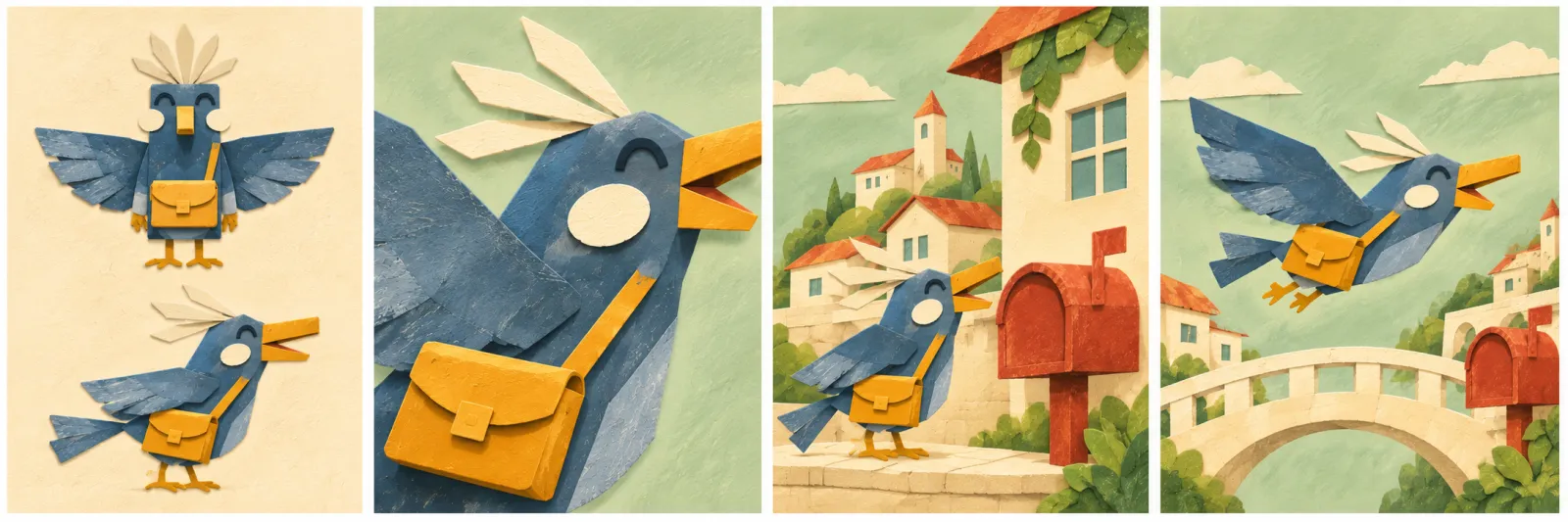
Reference plan: character views, identifying details, and two settings are reviewed as one visual system.
Step 5 approve a difficult connection first
Test the change between the bridge view and the mailbox close-up. Check the character's apparent size, travel direction, palette, and prop position across that connection. A successful establishing frame does not prove the closer view will preserve the design.
Step 6 archive the accepted episode
Save the approved references, script, shot list, accepted clips, edit version, and unresolved issues. Keep the original masters available for the next episode. The complete AI video workflow explains the wider handoff from reference material to the final edit.
Repair the failed layer rather than redesigning everything
Identify whether the problem is identity, style, geography, or timing. A changed satchel needs a prop correction. A bridge that moves behind the wrong shoulder needs a location or camera correction. A pause that feels slow may need an edit, with no new generation.
Use targeted editing only when the selected tool actually supports the required change, and inspect the whole revised interval afterward. Otherwise, return to the approved frame and regenerate the affected shot. A local correction can still alter another important detail.
Count preparation, attempted takes, review, and assembly separately. If a pilot needs five setups and each receives two attempts, that means ten video attempts as a planning example, not a price or success forecast. Reuse can reduce repeated preparation; every new output still needs review.
Start with one small pilot in PixTV. The first deliverable is a library another creator can understand, followed by an episode that actually follows it.
Frequently asked questions
How many character reference images do I need?
Prepare the views required by the planned shots and check their agreement. No universal count guarantees consistency. Follow the selected model's input limits and add a view when the story exposes an angle existing references cannot establish.
Does a reference library automatically lock identity?
No. It organizes the evidence used to direct and review a character. Input support depends on the workflow. Compare the resulting face, proportions, costume and movement with the approved reference, even when a dedicated identity feature is available.
Should locations use the same style as the characters?
Usually, for a coherent visual world. Record how backgrounds, props, light and character surfaces relate. A stable face against unrelated rendering can still feel inconsistent. Deliberate changes need a clear story or production reason.
Can one series use multiple outfits?
Yes. Save each approved outfit as a separate state and identify where it appears. Keep the underlying character master. A costume change should not change the face or body, and each cut needs the correct state.
Can I reuse the previous episode as the only reference?
Keep it as continuity material, alongside the original designs. Referencing only the latest output can carry accumulated errors forward. Compare new assets with the approved library and the relevant episode context.
Where should production costs be recorded?
Record preparation, image and video attempts, corrections, audio and assembly by episode. Use current displayed prices. Separate reusable preparation from new generation work; reusing a reference does not make every new shot free.